
You can access most of our online resources and e-journals off campus. However it can sometimes be a bit tricky, here are some pointers to help you:
- Always access via Library Search- once you are signed into Library Search you can type the name of the resource (e.g. Mintel) you want to access into the search box. Click on the link to open it. Accessing it via Library Search signals to the resource that you are from University of Westminster and will make it easier to log-in.
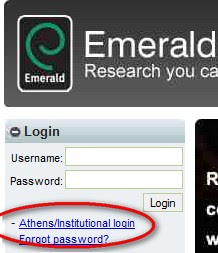
- Look for the Shibboleth/UK Federation/Institutional log-in link- once you have opened the resource, try to ignore any username/password boxes and instead look for a link which says either Shibboleth/UK Federation or login via your institution This will allow you select University of Westminster as your home institution.
- Log-in on the Westminster resource page with your university username and password- once you have completed the above you may be taken to a Westminster resource page, you can then login with your uni username and password.
BUSINESS SOURCE COMPLETE log-in, click the Shibboleth link


SEARCH FOR UNIVERSITY OF WESTMINSTER AND SELECT IT

EMERALD- select Institutional login and then UK Federation

PIC: Bergius on Flickr CC BY-NC-SA 2.0


