Showing posts with label Fame. Show all posts

Tuesday, 30 October 2012

FAME and Mintel training 2012


Not sure where to look for UK company information and market research reports?  Want to find out the turnover and profit of Tesco or get a market report on online grocery retailing?  Come to a FAME and Mintel training session to find out more.  


  • Wednesday 31 October 2012- FAME/Mintel training 
  • Sessions begin at 11am, 12 noon, 1pm 
  • In the Marylebone Library Training Room (ask at the Library counter for directions)
  • Turn up to any of the sessions, no need to book


If you can't make the session check out the below links for help and support:
FAME:
http://westminsterbusinessstudies.blogspot.co.uk/2011/11/fame-featured-e-resource.html

Mintel:
http://westminsterbusinessstudies.blogspot.co.uk/2012/10/how-to-access-and-use-mintel-quick.html

Friday, 26 October 2012

How to access and use FAME: a quick start guide to find UK company information

A new video clip is now available explaining how to access and use the e-resource FAME on and off campus and how to do a basic search to find UK company information.  View it here:

Tuesday, 1 November 2011

Monday, 31 October 2011

How to access and use FAME: a quick-start guide

FAME & Mintel: training sessions 2011


This week on the blog we will be adding a series of posts relating to Mintel and FAME, such as how to access them off campus, how to navigate them etc.  These two e-resources are used for finding market research and UK company information respectively.  To keep updated automatically please subscribe to the blog either via email or RSS (see links on left hand side of the blog).  

Upcoming training sessions for FAME/Mintel 2011: find out how to access these resources (on and off campus) and learn how to use them to find company and market information.

Classroom demos
Tuesday 1 November 11-12, 2011 Room: L195 (48 spaces)
Wednesday 2 November 11-12, 2011 Room L195 (48 spaces)
(the sessions are repeats so you only need to attend one)

Drop-Ins
During that week we will also be running drop-in sessions on “Using company and market tools (FAME/Mintel)” at Marylebone library.  The same information will be covered but there will be fewer spaces available than the classroom sessions.  Drop Ins will take place in Marylebone Library Training Room at 1-2pm from Monday 31 October to Friday 4 November 2011.  No need to book but space may be limited.

Wednesday, 23 February 2011

Featured resource: FAME: How to do a peer analysis


Next in our posts on our featured resource FAME is how to do a peer analysis.  The peer analysis enables you to compare a group of companies, chosen by you, against one another.   

1. First make sure you have cleared any previous searches you have done: on the home page if you see a box at the bottom of the page with your previous search strategy click the "clear all steps" button.


2. Now click on "company name".


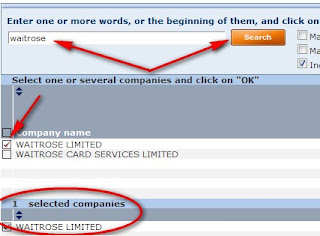
3. On the next screen you can search for your first company's name.  In the list of results tick the box next to the correct company.  This will add it to the selected companies in the box below.
 
4.  To add your next company click the "add a company" button and repeat step 3.  When you have finished adding companies and your chosen ones are all in the "selected companies" box click OK.
 
5.  Once you have clicked OK it will take you back to the main search page.  Now, from the menu on the right, click on peer analysis, from where you can choose a predefined analysis (e.g. comparing them by the key financials) or a new to create your own analysis. A new analysis will open up a wizard to guide you through the different categories you may want on your analysis. 


How to access FAME if Library Search goes down

There have been a few problems accessing Library Search today so if you are unable to access FAME that way please try this link: https://fame2.bvdep.com/ukfederation.aspx 
You will then need to choose University of Westminster from the drop-down menu, as before, and you may be required to enter your university username and password.

Featured resource: FAME


Continuing on with our featured resource, FAME: today we look at how to do a simple company search.  See our previous post if you want to know how to access FAME. 

1. Once you are in FAME enter your chosen company name in the search box in the top left hand corner.


2. From the list of results click on the company your require, you can always check the registered number if you are unsure.


3. The standard report will be shown, to see the full report select "report format - full report" from the menu on the right hand side.  You can scroll down the report to view the different sections.

4.  The menu along the right hand side shows the contents of the report, from here you can navigate to each individual section of the report.  For example if you just wanted to see the "key financials and employees" click on the financials and ratios tab and select "key financials and employees".  To go back to the main report select "report format - standard report" from the menu.


5. You can export the data to a spreadsheet, Word or a PDF.  Click on the export button.  You can either do this for just one section of the report (see step 4 above) or all sections of the report (when you are displaying the standard report).


6.  You can also modify which sections are shown in the report by clicking on the sections button and choosing which elements you want to see in the report. 


7.  When viewing figures remember to note what currency and unit is being used- for example figures are often given in th GBP or mil GBP.


8.  You can also view a peer report for the chosen company or view diagrams such as the ownership structure by selecting these sections from the menu (near the bottom).


See also our post.....how to do a peer analysis in FAME

Friday, 19 February 2010

Topical pick: sweet like chocolate

Photo by Sifu Renka on Flickr.com used under the creative commons license

According to this report from the BBC life is looking sweet for chocolate-maker Thorntons as they have reported a rise in profits. The sale of Cadbury to Kraft foods has also left chocolate (melting) in the spotlight recently. If you are interested in this hot topic, there is plenty of research to be done:

~Find out about the UK chocolate market, including its size, share and forecast from the Mintel report 'Chocolate confectionery- UK- April 2008', which includes a new market re-forecast. 

~Get a company report for Thorntons PLC on the financial database Fame
~Find out how much UK households spend on confectionery from the latest Family Spending report from the National Statistics.
~Borrow the book "Cadbury’s purple reign : the story behind chocolate’s best-loved brand" by John Bradley from Marylebone library. 
~Explore Cadbury's advertising techniques by viewing memorable ads such as the creme egg ads via the ad archive database Creative Club
~Research how the Kraft-Cadbury tale out played out in newspapers and journals by searching the databases Business Source Complete and Factiva for articles. 

And that's just the start.....