Friday, 18 October 2013

Week 4: Getting access to resources off campus


You can access most of our online resources and e-journals off campus.  However it can sometimes be a bit tricky, here are some pointers to help you:

  • Always access via Library Search- once you are signed into Library Search you can type the name of the resource (e.g. Mintel) you want to access into the search box.  Click on the link to open it.  Accessing it via Library Search signals to the resource that you are from University of Westminster and will make it easier to log-in.
  • Look for the Shibboleth/UK Federation/Institutional log-in link- once you have opened the resource, try to ignore any username/password boxes and instead look for a link which says either Shibboleth/UK Federation or login via your institution  This will allow you select University of Westminster as your home institution.
  • Log-in on the Westminster resource page with your university username and password- once you have completed the above you may be taken to a Westminster resource page, you can then login with your uni username and password.
BUSINESS SOURCE COMPLETE log-in, click the Shibboleth link


SEARCH FOR UNIVERSITY OF WESTMINSTER AND SELECT IT

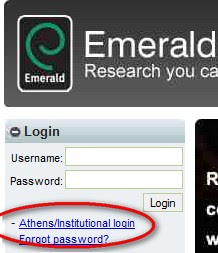
EMERALD- select Institutional login and then UK Federation

PIC: Bergius on Flickr CC BY-NC-SA 2.0

Monday, 7 October 2013

Week 3: Why reference?

Hear Bhagwan talk about referencing and why it is important.

Friday, 4 October 2013

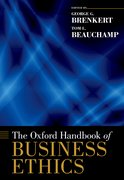
New e-book


The following e-book is now available:

George G. Brenkert (ed.)

Week 2: Finding journal articles


Finding journal articles can be a little daunting.  That's why we have put together this guide to talk you through the process of finding a specific journal article (from your reading list for example) and how to find journal articles on a topic.  For the latter, Business Source Complete is a great source to use and in the guide you will find a video describing how you can access and use Business Source Complete.

Picture: artiewhite on Flickr

Thursday, 26 September 2013

Week 1- Hello!


A belated welcome to new students and welcome back to returning students (and staff!).  We hope learning week 1 is going well.  We've put together some resources to help new students and as a refresher for returners:

Getting started (key resources and links for new WBS students): http://www.scoop.it/t/uniwestlib-business

Video help guides for online resources (e.g. FAME, Mintel, Business Source Complete): http://bit.ly/libvideos

Library and IT information for new students: http://www.westminster.ac.uk/library-and-it/new-students

FAQs and information about Marylebone Library: http://bit.ly/mrdorientation2013 (plus enter a competition to win £25 Amazon voucher)

Contact the Business Librarians with any questions: http://www.westminster.ac.uk/academicliaison 

Follow the library on Twitter: @UniWestLib 

We look forward to seeing you this Semester!

--
Picture credit: Odd.note on Flickr CC-BY-2.0

Thursday, 30 May 2013

Did you miss 'Get the Digital Edge' day in March?


You can now watch videos from the sessions here: westminster.ac.uk/digital-edge.  

Videos include:
  • Aimee Bateman talking about social media and job hunting 
  • Frances Gow on how to manage your online reputation
  • Jim McClellan shares his views on digital literacy 
  • Andrew Rigby of the Group discusses the importance of brand for today’s social media savvy companies
  • Jemma Perrin & Kevin Lawley run through the IT training opportunities on offer at the University of Westminter
  • Panel discussion - What skills, what for?  Frances Gow, Tarik Mahri, Rikki Morgan Tamosunas and David Chalcraft chaired by Gunter Saunders round off the day with discussion of the  themes from the day

Library Opening Hours for the Summer...

...can be found here: http://www.westminster.ac.uk/study/current-students/support-and-facilities/library-it-services/opening-hours-and-locations